Android Layer 3: Runtime (ART & Zygote)
ART is the managed runtime that executes app code. It replaced Dalvik in Android 5.0 (Lollipop).
The "Zygote" Boot Strategy
Launching a new Java Virtual Machine (JVM) for every app is slow. Android solves this with Zygote.
- Boot Time: The Zygote process starts and preloads the entire Android Framework (thousands of classes) into RAM.
- App Launch: When you open an App, Zygote forks itself.
- Copy-on-Write (COW): The new app process shares the memory of the Zygote. It only uses new RAM when it writes unique data. This allows apps to launch almost instantly with the framework already loaded.
Zygote64 and Zygote32
Modern Android devices run two Zygote processes:
- zygote64: Forks 64-bit apps (most modern apps)
- zygote: Forks 32-bit apps (legacy apps, games with 32-bit native libs)
When an app is launched, ActivityManagerService requests the appropriate Zygote based on the app's ABI (Application Binary Interface).
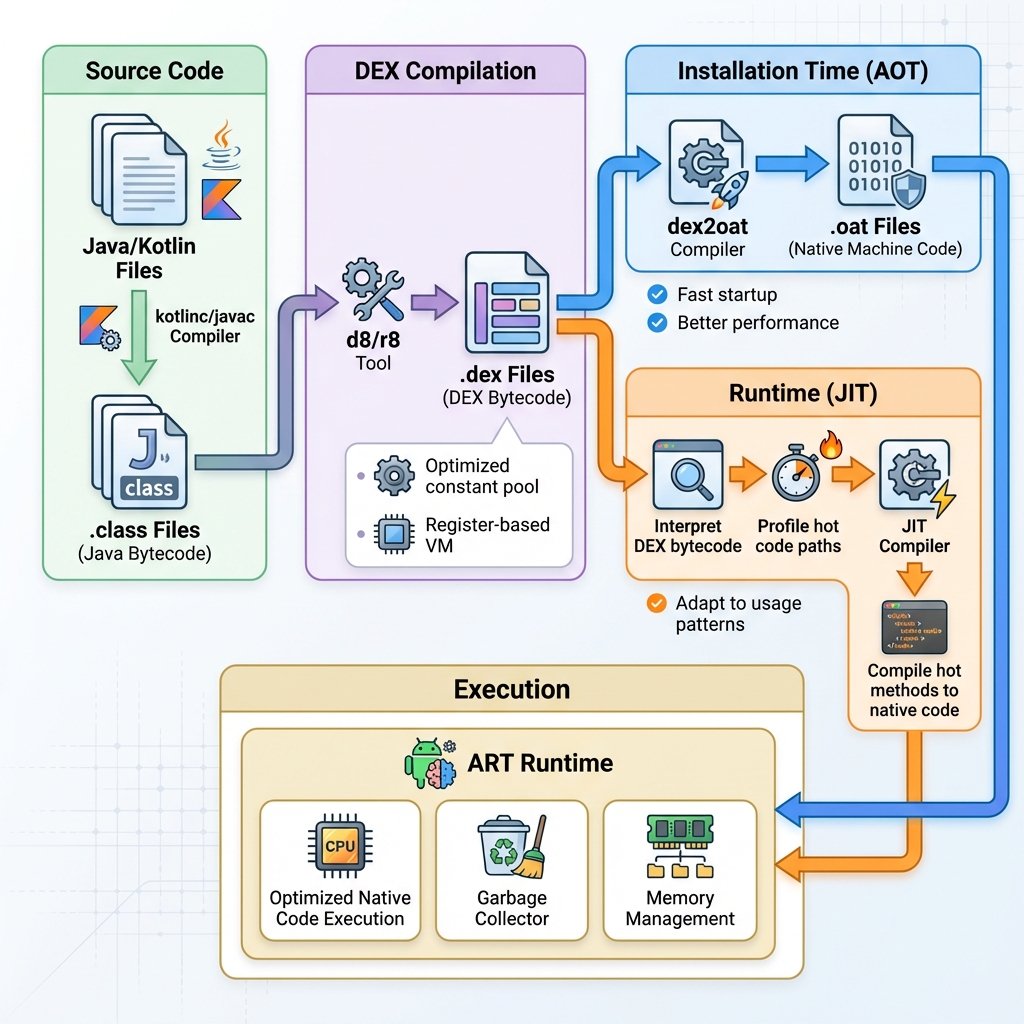
The diagram above illustrates the complete compilation pipeline from Java/Kotlin source to executed native code, showing both AOT (Ahead-of-Time) and JIT (Just-in-Time) compilation paths.
DEX Format
DEX (Dalvik Executable) is a bytecode format optimized for mobile:
- Smaller file size than JAR (shared constant pool)
- Optimized for low-memory devices
- Register-based VM (vs stack-based JVM)
Dalvik Bytecode (.dex files)
Dalvik Bytecode is Android's platform-independent instruction format, stored in .dex (Dalvik Executable) files. Unlike Java bytecode (.class files), DEX is optimized for mobile devices with limited memory.
Think of DEX as Sheet Music for Android. Just like sheet music can be played by any musician (interpreter) or memorized for faster performance (compiler), DEX code can be interpreted or compiled to native code.
Why DEX instead of Java Bytecode?
| Feature | Java .class | Android .dex |
|---|---|---|
| Constant pool | Per-class (duplicated) | Shared across all classes |
| String storage | Duplicated | Deduplicated |
| Method IDs | Per-class | Global index |
| File size | Larger | ~50% smaller |
| Loading speed | Slower (many files) | Faster (single file) |
DEX File Structure:
classes.dex
├── Header (magic, version, checksums)
├── String IDs (all strings used in app)
├── Type IDs (all types/classes)
├── Proto IDs (method prototypes)
├── Field IDs (all fields)
├── Method IDs (all methods)
├── Class Definitions
│   ├── Class metadata
│   ├── Static fields
│   ├── Instance fields
│   └── Methods (bytecode instructions)
└── Data Section (actual bytecode)
Example DEX Instructions:
// Java code
int sum = a + b;

// DEX bytecode
add-int v0, v1, v2  // v0 = v1 + v2 (register-based)

// vs Java bytecode (stack-based)
iload_1      // Push a onto stack
iload_2      // Push b onto stack
iadd         // Pop two values, add, push result
AOT vs JIT Compilation
| Feature | AOT (Ahead-of-Time) | JIT (Just-in-Time) |
|---|---|---|
| When | During app installation or idle | At runtime (hot code paths) |
| Speed | Faster startup | Slower startup, faster over time |
| Memory | More storage | Less storage |
| Used in | Android 5.0+ | Android 7.0+ (hybrid) |
Check Compilation Status:
Profile-Guided Compilation (PGO)
ART uses Profile-Guided Optimization to decide which methods to compile. Instead of blindly compiling everything, it tracks which code is actually used.
How it works:
- Runtime Profiling: JIT compiler tracks "hot" methods (frequently executed) and saves them to a
.proffile - Idle Compilation: During device idle time,
dex2oatreads the profile and AOT-compiles only hot methods - Result: Faster app startup (pre-compiled hot paths) without wasting storage on cold code
Profile Lifecycle:
App Launch → JIT Profiling → .prof File → Idle Time → dex2oat (AOT) → Optimized .oat
Check Profile Status:
Compilation Modes:
verify: Only verify DEX (no compilation)speed: AOT-compile everything (large storage, fast execution)speed-profile: AOT-compile only profiled hot methods (balanced)space: Minimal compilation (saves storage)
Note: Profile-guided compilation is why apps get faster after a few days of use—ART learns your usage patterns and optimizes accordingly.
Key Runtime Components
1. Compiler (AOT/JIT)
The dex2oat compiler translates DEX bytecode into native machine code. It uses a hybrid approach: A Translator. It takes the generic code developers write (Java/Kotlin) and translates it into the specific "native language" (Machine Code) of your phone's processor so it runs fast.
- JIT: Compiles frequently used code (hot paths) during runtime.
- AOT: Compiles code during device idle maintenance windows.
2. Interpreter
Executes DEX bytecode directly if it hasn't been compiled yet. It is slower but starts immediately. A Simultaneous Interpreter. If the code is not yet translated (compiled), the Interpreter reads and executes it line-by-line. It's slower, but allows you to start using an app immediately while the Compiler works in the background.
3. Garbage Collector (GC)
An Automatic Janitor. Apps constantly create temporary data (variables, objects) while running. The GC runs in the background to sweep up and delete data that is no longer being used, preventing your phone's memory from filling up with "trash".
ART uses a sophisticated Concurrent Copying (CC) GC to minimize UI jank.
Memory Allocation Strategy
Allocating memory must be instant. ART uses distinct strategies:
- TLAB (Thread Local Allocation Buffer): Each thread gets a small "private workspace" in the Heap. It can create small objects here without locking (zero contention). This is extremely fast.
- RosAlloc (Runs-of-Slots): A custom allocator for larger objects, optimized to reduce fragmentation.
Region-Based GC
The Heap is divided into distinct "Regions" (Buckets).
- Evacuation: Instead of finding trash, the GC finds Live Objects, copies them to a new Region, and nukes the old Region entirely.
- Compaction: Because it moves objects together, it inherently defragments the heap (solving the "Swiss Cheese" memory problem).
- Generational: Newly allocated objects are in the "Young Gen". If they survive one GC cycle, they are promoted to "Old Gen" (where GC runs less often).
4. JNI (Java Native Interface)
The bridge that allows Java/Kotlin code to call functions in Native Libraries (C/C++). It performs the expensive context switch between the managed runtime and the raw CPU execution.
A Bridge. It allows safe, easy-to-write Java code to call fast, powerful, but dangerous C++ code. This is how a Java Game can talk to the OpenGL graphics engine.
5. Class Loader
Responsible for finding and loading .dex files from the APK into memory.
The Librarian. When an app needs to use a specific feature (a "Class"), the Class Loader goes to the library (APK), finds the right book (DEX file), and opens it so the app can read it.
8. Boot Image (.art files)
The Boot Image is a pre-initialized heap snapshot containing core framework classes (like String, Object, Class) that are used by all apps. It's Android's secret weapon for fast app startup.
Think of the Boot Image as a Photocopy Master. Instead of writing the same document (framework classes) from scratch for every copy (app), you make one perfect master and photocopy it instantly for each new app.
How it Works:
-
Build Time: During Android compilation,
dex2oatcompiles framework JARs and creates:boot.art- Pre-initialized heap with framework objectsboot.oat- Native code for framework methodsboot.vdex- Verified DEX for framework
-
Boot Time: Zygote loads the boot image into memory once
-
App Launch: When an app forks from Zygote, it inherits the boot image via copy-on-write (COW)
- Shared pages: Read-only framework objects (saves RAM)
- Private pages: App-specific objects
Memory Benefits:
- Can save hundreds of megabytes of RAM on a device
- Reduces GC pressure since these objects are "immortal"