Android Layer 5: HAL & Kernel
Why HwBinder?
HIDL HALs use HwBinder (Hardware Binder) instead of regular Binder:
- Separate driver:
/dev/hwbindervs/dev/binder - Reason: Isolates vendor HAL crashes from system services
- Security: Different SELinux contexts prevent vendor code from accessing system Binder
Modern AIDL HALs (Android 11+) use regular Binder again—the isolation is now enforced through SELinux policies instead of separate drivers.
The Framework (Java) cannot talk to the Hardware directly. The architecture has evolved significantly to solve this:
- Legacy (Pre-Treble): System Server loaded vendor
.sofiles directly (dlopen). If the vendor code crashed, the whole system crashed. - HIDL (Treble): Hardware drivers moved to separate processes, communicating via a special
HwBinder. - AIDL (Modern): The separate "Hardware Binder" was merged back into the standard Binder, allowing universal communication between System and Vendor components using a stable interface.
Common HALs
1. Graphics HAL (Gralloc & HWC)
The Graphics subsystem is the most complex pipeline in Android. It involves two main HALs working in tandem:
-
Gralloc (Graphics Allocator): The "Painter's Setup".
- Role: Allocates uncached, shared memory buffers (SharedBuffer) accessible by the GPU, CPU, and Display Hardware.
- Metaphor: Gralloc provides the clean canvas that apps paint onto.
-
HWC (Hardware Composer): The "Final Assembly".
- Role: Accepts multiple buffers (Surfaces) and composites them into a single image for the display.
- Metaphor: HWC takes the finished paintings (from apps, status bar, nav bar) and glues them onto a single wall (the screen).
Graphics Data Flow (Official Pattern):
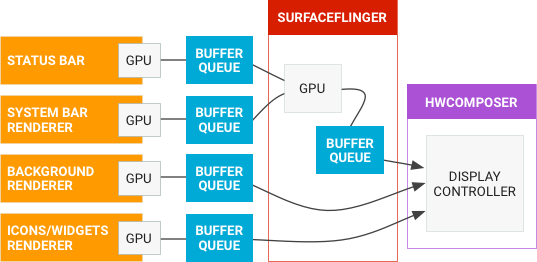
The Graphics Pipeline (Sequence):
Display Driver (DRM / KMS)
The Display Driver is the kernel component that actually lights up the pixels on your screen. Android uses the standard Linux DRM (Direct Rendering Manager) subsystem.
- DRM (Direct Rendering Manager): The kernel subsystem for managing GPUs and displays.
- KMS (Kernel Mode Setting): A part of DRM responsible for setting the display resolution, refresh rate, and color depth.
- Atomic Display: Modern Android requires "Atomic" updates. This means the HWC sends a complete "frame bundle" (layers + configuration) to the driver in one go. If the hardware can't handle it, the entire update fails safely (no partial glitches).
The "Swap Buffer" Concept
When an app finishes drawing a frame, it calls eglSwapBuffers(). This triggers a crucial synchronization event:
- Queue: The app's filled buffer ("Back Buffer") is put into the BufferQueue.
- Flip: The consumer (SurfaceFlinger) is notified. It latches onto this new buffer at the next VSync signal.
- Front Buffer: The new buffer becomes the "Front Buffer" (what you see). The old buffer is returned to the app to be reused for the next frame.
Key Concepts:
- BufferQueue: The "Conveyor Belt". It connects the Producer (App) to the Consumer (SurfaceFlinger).
- Triple Buffering: Using three buffers (Front, Back, Pending) to ensure the GPU never waits for the screen to refresh (VSync).
- Hardware Overlays: HWC can composite layers directly in display hardware, skipping the GPU to save power.
- Backpressure: If a scene is too complex for HWC, it rejects it, forcing SurfaceFlinger to use the GPU (Client Composition).
📁 Official Documentation: Graphics Architecture | Gralloc | AOSP Source:
hardware/interfaces/graphics/
2. Audio HAL
Connects higher-level framework APIs (like android.media) to underlying audio drivers and hardware. Ideally, this defines the standard interface that audio services call into.
Architecture Evolution (Android 14+):
- AIDL (Current): Starting with Android 14, the Audio HAL is defined using AIDL. Partners are encouraged to switch to this modern interface for new features, better performance, and standard stability.
- HIDL (Legacy): Used in older versions. No new features are added to HIDL Audio HAL as of Android 14.
- Benefits: Switching to AIDL frees up disk space/RAM (by removing legacy support) and enables new user-facing audio features.
📁 Official Documentation: Audio HAL Implementation | AOSP Source:
hardware/interfaces/audio/
3. Camera HAL
Manages camera hardware and image processing, handling request pipelines and metadata.
📁 Official Documentation: Camera HAL | AOSP Source:
hardware/interfaces/camera/
4. Sensors HAL
Provides access to physical sensors (accelerometer, gyroscope, light sensor).
📁 Official Documentation: Sensors HAL | AOSP Source:
hardware/interfaces/sensors/
5. Biometrics HAL
Securely handles fingerprint, face, and iris authentication data.
📁 Official Documentation: Biometric HAL | AOSP Source:
hardware/interfaces/biometrics/
6. Bluetooth & Wi-Fi HAL
Manages wireless connectivity stacks (HCI, wpa_supplicant).
📁 Official Documentation: Bluetooth | Wi-Fi | AOSP Source:
hardware/interfaces/bluetooth/
HAL → Kernel Interface
HALs don't talk to hardware directly—they use kernel drivers via standard Linux interfaces.
Example: Camera HAL
Common Kernel Interfaces:
| HAL Type | Kernel Interface | Device Node | Subsystem |
|---|---|---|---|
| Graphics | DRM/KMS | /dev/dri/card0 | Direct Rendering Manager |
| Audio | ALSA | /dev/snd/pcmC0D0p | Advanced Linux Sound Architecture |
| Camera | V4L2 | /dev/video0 | Video4Linux2 |
| Sensors | IIO | /dev/iio:device0 | Industrial I/O |
| Input | evdev | /dev/input/event0 | Event Device |
| Bluetooth | HCI | /dev/hci0 | Host Controller Interface |
Inspect Kernel Devices:
Why This Matters:
- HALs are userspace (can crash without kernel panic)
- Kernel drivers provide stable ABI (Application Binary Interface)
- OEMs implement HALs, kernel drivers come from SoC vendors (Qualcomm, MediaTek)
Interacting with HALs (System Engineer Tools)
As a system engineer, you often need to talk to HALs directly without writing an app.
1. Listing Services (lshal)
Lists all registered HIDL/AIDL services.
2. Calling Services (cmd & service call)
-
cmd: High-level wrapper for Framework services (which then call HALs). -
service call: Low-level Binder calls to native services that talk to HALs.
Note:
dumpsys batterytalks to BatteryService (Framework), not the Battery HAL directly. The service then queries the HAL internally.
3. VINTF Validation
If a new HAL doesn't match the framework requirements, the device may bootloop. Check compatibility:
Linux Kernel
Android IS Linux. At its core, Android runs on top of the Long Term Support (LTS) Linux Kernel (e.g., Kernel 5.15, 6.1). However, it's not a standard desktop kernel.
📁 Official Documentation: Android Kernel | Source:
common/
Android's "Secret Sauce" Patches
Android adds critical features to the upstream Linux kernel:
- Binder Driver:<span id="binder-driver"></span> Custom IPC mechanism (discussed above).
- Ashmem (Anonymous Shared Memory):<span id="ashmem"></span> Efficient memory sharing system.
- Low Memory Killer (LMK): Aggressively kills processes when RAM is critical (unlike Linux's OOM killer which is slower).
- Wakelocks:<span id="wakelocks"></span> Prevents the CPU from sleeping when the screen is off (crucial for battery life).
Hardware & Bootloader
Before the Kernel starts, the hardware must initialize.
- Boot ROM: Hardcoded instructions in the CPU.
- Bootloader: <span id="bootloader"></span>Loads the kernel into RAM. (Verified Boot happens here).
- Kernel: Mounts the file system and starts process #1 (
init).
💡 Analogy: The Bootloader is the Rocket Booster. Its only job is to get the payload (Kernel) into orbit (RAM) and then detach.
Android Partition Layout
Modern Android (Android 10+) uses Dynamic Partitions.
| Partition | Content | Read/Write |
|---|---|---|
/system | Android Framework, System Apps, Libraries | Read-Only |
/product | OEM-specific apps and customizations | Read-Only |
/vendor | HALs, Board-specific drivers, firmware | Read-Only |
/data | User apps, photos, settings, database | Read-Write |
/boot | Linux Kernel + Ramdisk | Read-Only |
/recovery | <span id="recovery"></span>Recovery tools (Fastbootd, ADB) | Read-Only |
Partition Details
/system: The core OS partition. It contains the Android Framework, system libraries, and pre-installed system apps (like Settings, SystemUI). It is mounted read-only to prevent malware from modifying system files./vendor: Contains SoC-specific hardware drivers and HALs (Hardware Abstraction Layers). This partition allows the OS to be updated independently of the hardware drivers (Project Treble)./product: Contains manufacturer-specific customizations, such as custom apps, boot animations, and non-essential system components./data: The only writable partition for users. It stores all your downloaded apps, photos, messages, and settings. When you "Factory Reset" a phone, this is the partition being wiped./boot: Contains the functionality to boot the phone: the Kernel and the Ramdisk (initial root filesystem)./recovery: A standalone mini-OS used for OTA updates, factory resetting, and debugging (via ADB or Fastboot).
TrustZone (TEE)
TrustZone (Trusted Execution Environment) is a secure area of the main processor. It runs a separate, secure OS (like Trusty) alongside Android. It handles:
- Keymaster: Cryptographic keys (Keystore)
- Biometrics: Fingerprint matching
- Gatekeeper: Pattern/Password verification
- Widevine: DRM content protection